obsidian-digital-garden
todo
the journey
Digital Garden - Publish Obsidian Notes For Free
- 把
titleproperty设置为我需要的标题 - 打开inline title
custom css
为什么默认首页title是notes?
修改路径导致文章重复
这时需要重新发布所有文章,而不是publish active note,才能删除错误的重复文章。
√ 特别顽固的白色背景
最后以这样的方式修好了:
.theme-light {
  --background-primary: #f8f7f6;
  --background-secondary: #f3f2f1;
  --text-normal: #333;
  background: var(--background-primary);
  color: var(--text-normal);
}
markdown test is weirdly broken from time to time
analytics
根据这个issue操作,只需要:
- 打开vercel analytics(因为我把网站host在vercel上,它这个免费套餐可以看30天的数据)
- 在我的网站repo里新建
src/site/_includes/components/user/common/footer/analytics.njk(github可以直接新建文件,键入/会创建新目录) - 在里面粘贴:
 <script defer src="/_vercel/insights/script.js"></script>
 <script defer src="/_vercel/speed-insights/script.js"></script>
这样就完成了。
dataview列表的标题里不能包含|
否则好像|后面的内容都会被切除。
图片宽度的问题,怎么自动隐藏filetree
√ graph seems to be broken
和publish canvas是同个问题。
simple page setting doesn't work
√ cannot publish canvas
解决了,强制reload obsidian更新metadata cache即可。
这之后graph也开始显示了。
想要关掉自动导航栏,自己写header组件
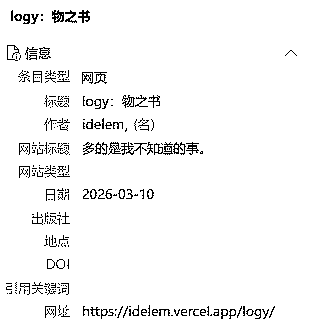
zotero收录元数据
src/site/_includes/components/user/notes/head/里面添加了一个citation.njk:
{% set _title = title or page.fileSlug %}
{% set _date = created or page.date %}
<meta property="og:type" content="article">
<meta property="og:site_name" content="{{ meta.siteName }}">
<meta property="article:published_time" content="{{ _date | string | truncate(10, true, '') }}">
<meta name="author" content="你的名字">
<script type="application/ld+json">
{
  "@context": "https://schema.org",
  "@type": "BlogPosting",
  "headline": {{ _title | dump | safe }},
  "author": {"@type": "Person", "name": "你的名字"},
  "datePublished": "{{ _date | string | truncate(10, true, '') }}",
  "inLanguage": "zh",
  "url": "{{ meta.siteBaseUrl }}{{ page.url }}",
  "isPartOf": {"@type": "Blog", "name": {{ meta.siteName | dump | safe }}}
  {% if description %},"description": {{ description | dump | safe }}{% endif %}
}
</script>
效果: